
Google Gemini has evolved into much more than a simple AI chatbot. In 2026, users can use Gemini AI for research, writing, coding, brainstorming, document creation, data analysis and productivity.
However, many people still use Gemini by typing short questions and accepting the first answer. That approach can work, but it does not unlock the full potential of Google Gemini AI.
If you want to use Gemini professionally, the key is to give it better instructions, provide useful context and use the right tools for each task.
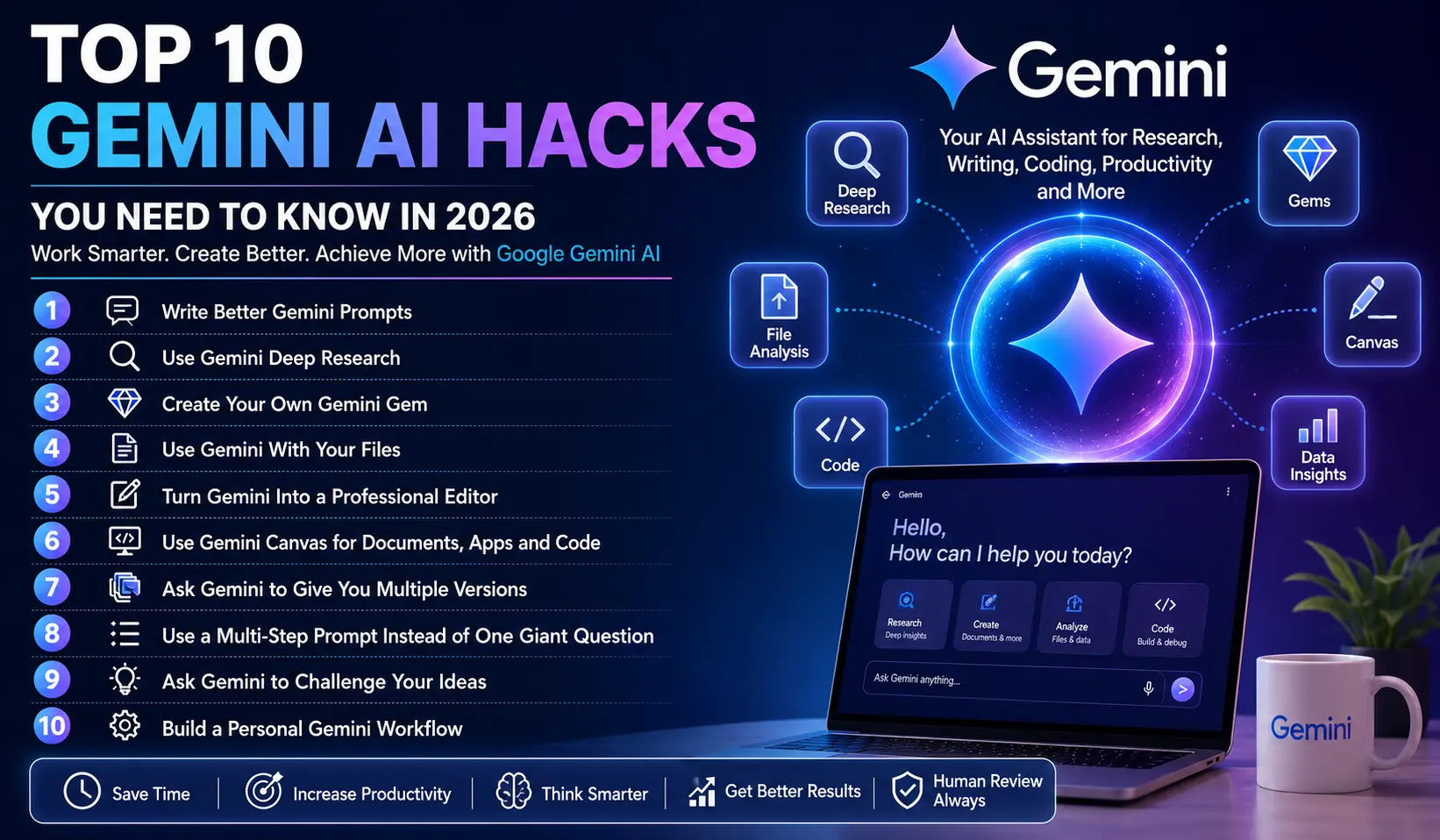
Here are the top 10 Gemini AI hacks you need to know in 2026.
1. Write Better Gemini Prompts
The quality of your prompt has a major impact on the quality of the response.
Instead of asking:
“Write an article about AI.”
Give Gemini a specific role, task, audience and format.
For example:
“Act as an experienced technology journalist. Write a 1,000-word beginner-friendly article about Google Gemini AI for U.S. readers. Use short paragraphs, H2 headings, practical examples and a professional but conversational tone.”
This gives Gemini much more direction.
A useful prompt structure is:
Role + Task + Context + Audience + Format + Requirements
This is one of the most important Gemini AI prompts techniques for professional users.
2. Use Gemini Deep Research for Serious Research
One of the most useful professional features is Deep Research.
Instead of manually opening dozens of search results, you can ask Gemini to conduct deeper research on a topic. Google says Deep Research can use Google Search as a source by default and can also work with additional sources such as Gmail and Drive when connected.
For example, instead of asking:
“Tell me about electric vehicles.”
Try:
“Research the U.S. electric vehicle market in 2026. Identify major trends, consumer concerns, market developments and important statistics. Organize the findings into an executive summary, key trends and sources that I should verify.”
Gemini can create a research plan before generating the report.
This makes Gemini Deep Research particularly useful for bloggers, journalists, students, researchers and business professionals.
3. Create Your Own Gemini Gem
If you repeatedly perform the same type of task, stop writing the same instructions every day.
Create a Gem.
Google describes Gems as customized versions of Gemini designed for repeatable tasks and specialized instructions. You can create instructions covering your preferred role, task, context and output format.
For example, a blogger could create a Gem called:
SEO Content Writer
Its instructions could say:
“Act as an expert SEO writer. Use natural language, short paragraphs, strong headings, active voice and Google Discover-friendly formatting. Always provide an SEO title, meta description, slug, keywords and social media description.”
Now you can reuse that workflow instead of rebuilding the prompt every time.
This is one of the best Gemini AI productivity hacks for people who perform repetitive tasks.
4. Use Gemini With Your Own Files
Generic AI answers are not always enough.
Sometimes you need Gemini to understand your own documents, reports, spreadsheets or other files.
Upload the relevant material and ask Gemini to analyze it.
For example:
“Analyze this sales report and identify the three biggest changes compared with the previous period. Present the findings in a table and explain possible reasons.”
This approach is much more useful than asking Gemini to guess based on general knowledge.
Google’s current Gemini documentation also lists file uploads and large context windows, with higher limits available on some Google AI plans.
5. Turn Gemini Into a Professional Editor
Don’t only use Gemini to generate content.
Use it to improve content you already created.
For example:
“Edit this article for grammar, clarity and readability. Keep the original meaning. Remove unnecessary repetition and make the paragraphs easier to scan.”
You can also ask Gemini to act as:
- A copy editor
- SEO editor
- Proofreader
- Fact-checking assistant
- Headline editor
- Social media editor
- Business writing assistant
This workflow is particularly useful because you remain responsible for the original ideas while Gemini helps improve presentation.
6. Use Gemini Canvas for Documents, Apps and Code
Gemini Canvas can be useful when you want to move beyond a simple chat response.
Google says Canvas can be used to create or edit documents, apps, slides and code.
For example, instead of asking:
“Give me ideas for a presentation.”
Try:
“Create a 10-slide presentation outline about AI productivity for small businesses. Include a title slide, key statistics, practical examples, risks and a final action plan.”
You can also use Canvas for coding projects and iterative editing.
The important hack is to treat Gemini as a collaborator rather than simply a question-answering tool.
7. Ask Gemini to Give You Multiple Versions
One of the simplest Gemini prompts tricks is to request alternatives.
For example:
“Give me five headlines for this article. Make the first one news-focused, the second curiosity-driven, the third SEO-focused, the fourth suitable for Google Discover and the fifth suitable for social media.”
This gives you options instead of forcing you to accept one AI-generated answer.
You can use the same technique for:
- Blog titles
- Email subject lines
- YouTube titles
- Social captions
- Product descriptions
- Ad copy
- Meta descriptions
8. Use a Multi-Step Prompt Instead of One Giant Question
Professional AI users often break complex tasks into stages.
For example, instead of asking Gemini to research, write, optimize and publish an article in one prompt, use a workflow:
Step 1: Research the topic.
Step 2: Identify the audience and search intent.
Step 3: Create an outline.
Step 4: Write the first draft.
Step 5: Improve readability.
Step 6: Create SEO metadata.
Step 7: Create social media content.
This makes it easier to review the output at every stage.
It also gives you more control over the final result.
9. Ask Gemini to Challenge Your Ideas
Most people ask AI to agree with them.
A better approach is to ask it to find weaknesses.
Try this:
“Act as a critical reviewer. Identify the weakest assumptions in this plan, potential risks, missing information and three ways the strategy could fail.”
This turns Gemini into a useful brainstorming and decision-support assistant.
You can use the technique for business plans, content strategies, marketing campaigns, product ideas and presentations.
The goal is not to let AI make the decision for you. Instead, use it to uncover questions you may have missed.
10. Build a Personal Gemini Workflow
The biggest Gemini AI hack in 2026 is not a single prompt.
It is creating a repeatable workflow.
For example, a content creator could build this system:
Gemini Deep Research → Content Outline → Gemini Draft → Editing → SEO Optimization → Social Media Posts
A business user could create:
Research → Data Analysis → Strategy → Presentation → Email Summary
A developer could use:
Requirement → Architecture → Code → Debugging → Documentation
Gems can make repetitive instructions easier to reuse, while Canvas can help with documents, apps and code.
How to Use Gemini AI Professionally in 2026
The professional way to use Google Gemini AI is to treat it as an assistant, not an automatic replacement for your judgment.
Start with a clear objective. Give Gemini enough context. Specify the audience and desired output. Then review the result before using it.
For important information, especially statistics, financial information, legal matters, medical information or current events, verify important claims with reliable sources.
Also avoid blindly publishing AI-generated content. Google itself advises users to use discretion when relying on or publishing content generated by Gemini.
Final Thoughts
Gemini AI in 2026 is becoming increasingly useful for people who know how to build effective workflows around it.
The biggest improvement does not come from simply asking more questions. It comes from asking better questions and using the right Gemini feature for the job.
Start with better prompts. Then experiment with Deep Research, Gems, file analysis and Canvas. Finally, build repeatable workflows that save time while keeping human review in the process.
If you use these top 10 Gemini AI hacks, Google Gemini can become a powerful tool for research, content creation, productivity, coding and professional work.