
Millions of people use ChatGPT for questions, writing, brainstorming and everyday tasks. But simply opening ChatGPT and typing a question does not always produce the best possible result.
The difference often comes down to how you use ChatGPT.
With the right ChatGPT hacks, you can get more useful answers, create better content, solve problems faster and turn ChatGPT into a practical productivity assistant. Whether you are a beginner, professional, student, business owner or content creator, learning a few simple ChatGPT tips and tricks can make a noticeable difference.
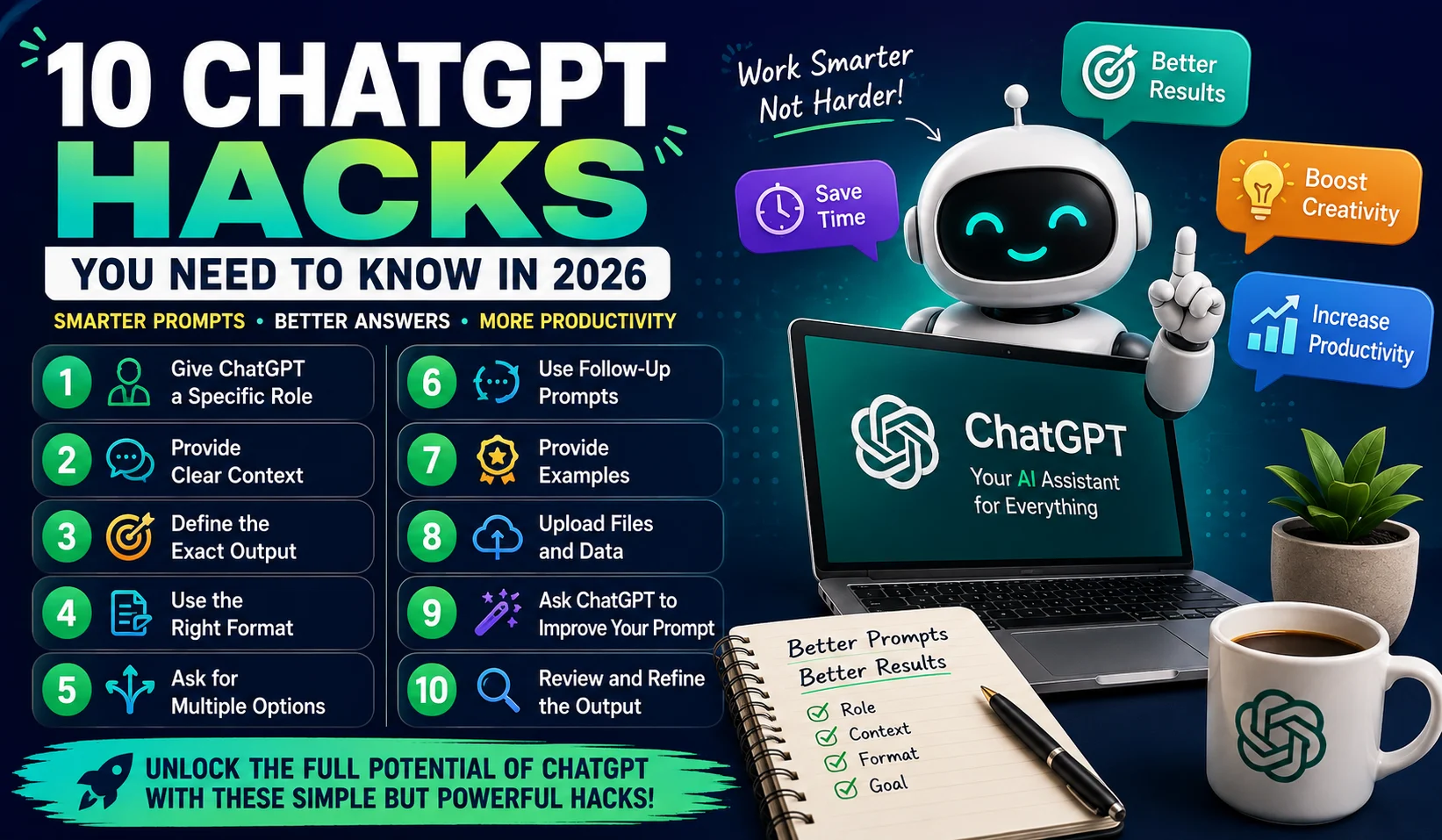
In this guide, we explore 10 practical ChatGPT hacks you can start using in 2026.
1. Give ChatGPT a Specific Role
One of the simplest ChatGPT tricks is to tell it what role you want it to take.
Instead of asking:
“Write an article about digital marketing.”
Give ChatGPT more direction:
“Act as an experienced digital marketing strategist and explain five digital marketing strategies for small businesses.”
The second prompt establishes a clear perspective.
You can ask ChatGPT to act as a:
- SEO specialist
- Teacher
- Business consultant
- Content writer
- Software developer
- Marketing strategist
- Career coach
- Research assistant
A role does not magically make every answer accurate, but it gives ChatGPT useful context about the type of response you expect.
2. Give ChatGPT Context Before Your Question
Another powerful ChatGPT hack is providing relevant background information.
AI responses can become much more useful when ChatGPT understands your situation.
For example, don’t simply say:
“Give me YouTube ideas.”
Instead, explain:
“I run a faceless YouTube channel about personal finance for a U.S. audience. I use AI voiceovers and stock footage. Give me 20 video ideas suitable for beginners.”
Now ChatGPT knows your audience, content format and subject.
When using ChatGPT for work, include information such as your goal, target audience, industry, limitations and preferred style.
The more relevant context you provide, the easier it is for ChatGPT to produce an answer that matches your needs.
3. Tell ChatGPT Exactly What You Want
A common mistake is giving ChatGPT a vague instruction and expecting a highly specific result.
Instead, clearly define the desired outcome.
For example:
“Give me 15 blog titles about passive income. Keep each title under 60 characters and make them suitable for beginners.”
This is better than:
“Give me passive income titles.”
You can specify:
- Word count
- Number of ideas
- Tone
- Audience
- Format
- Length
- Keywords
- Level of detail
This ChatGPT tip is especially helpful when you’re creating content, reports, emails or business documents.
4. Ask for Different Output Formats
ChatGPT can organize information in many ways.
If you want easy-to-scan information, tell ChatGPT how you want the answer structured.
For example:
“Compare these five AI tools in a table with columns for price, best use, main features and ideal user.”
You can also request:
- Bullet points
- Tables
- Step-by-step guides
- Checklists
- FAQs
- Scripts
- Summaries
- Pros and cons
- Comparison charts
This is one of the best ChatGPT productivity hacks because you receive information in a format that is easier to use immediately.
5. Don’t Accept the First Answer
One of the most useful ChatGPT tips is to treat the first response as a starting point.
You can continue the conversation and ask ChatGPT to improve it.
For example:
“Make the introduction more engaging.”
Then:
“Simplify the language.”
Then:
“Remove repetitive points.”
Then:
“Make it more useful for beginners.”
This iterative approach can produce a much stronger result than trying to write one enormous prompt.
You can use follow-up prompts for articles, emails, business ideas, scripts, coding and almost any other task.
6. Ask for Multiple Options
When you’re making a decision, don’t ask ChatGPT for only one answer.
Ask for alternatives.
For example:
“Give me 10 YouTube channel names related to AI and money. Keep them short, memorable and suitable for a global audience.”
After receiving the list, continue with:
“Rank the five strongest names based on memorability and brand potential.”
You can use this ChatGPT trick for:
- Blog titles
- YouTube titles
- Domain names
- Business names
- Headlines
- Product names
- Marketing slogans
- Content ideas
Multiple options give you more room to compare before choosing.
7. Ask ChatGPT to Improve Your Prompt
Here’s a particularly useful technique for beginners.
If you aren’t sure how to write a good prompt, ask ChatGPT to improve your prompt before performing the task.
Try:
“Improve my prompt for clarity, accuracy and better results. Keep my original objective and requirements. Show me the improved prompt first.”
This turns ChatGPT into a prompt optimization assistant.
You can then use the improved prompt for your actual task.
This technique is useful for complex requests involving SEO, research, programming, business planning and content creation.
8. Give ChatGPT an Example
If you want a specific structure or writing style, provide an example.
For instance:
“Here is an example of the article structure I prefer. Analyze its organization, heading style and tone. Then create a completely new article on my topic using the same type of structure without copying the original wording.”
This is a useful ChatGPT hack for content creators.
Examples can help communicate things that are difficult to explain with instructions alone.
You can provide examples for:
- Blog posts
- Social media captions
- Emails
- Product descriptions
- Video scripts
- SEO articles
- Business proposals
The goal should be to communicate the desired format and style, not reproduce someone else’s content.
9. Use ChatGPT With Your Files
ChatGPT can also work with supported uploaded files and data.
Depending on the features available to your account, you can upload documents, spreadsheets, presentations, images and other files for analysis. OpenAI’s documentation describes capabilities including file analysis, data analysis and image understanding.
For example, instead of manually reading an entire report, you could ask:
“Summarize this document into five key points and identify the most important action items.”
For a spreadsheet, you might ask:
“Analyze this sales data and identify the strongest and weakest months.”
This makes ChatGPT useful for research, business and productivity.
However, always review important results yourself, particularly when decisions involve financial, legal or other high-stakes information.
10. Ask ChatGPT to Review Its Own Work
Before publishing or using an important response, ask ChatGPT to critique it.
For example:
“Review this article for repetition, unclear statements, weak sections and keyword overuse. Suggest improvements without changing the main topic.”
For SEO content, you can ask:
“Check whether the primary keyword is used naturally and identify opportunities to improve search intent and readability.”
For an email:
“Review this email from the recipient’s perspective. Make it clearer, more professional and concise.”
This final review step can improve the quality of your output considerably.
Bonus ChatGPT Hack: Create Reusable Prompts
If you repeatedly perform the same task, don’t create a new prompt from scratch every time.
Create a reusable ChatGPT prompt template.
For example, a content creator could create a template containing:
- Topic
- Primary keyword
- Target audience
- Word count
- Tone
- Heading structure
- SEO requirements
- FAQ requirements
- Meta description
Each time you create an article, change the topic and keyword while keeping the basic framework.
This can turn ChatGPT into a repeatable content workflow instead of simply an occasional chatbot.
How to Write Better ChatGPT Prompts
Good prompts don’t necessarily have to be extremely long.
A useful prompt usually answers five questions:
What do you want?
Clearly describe the task.
Who is it for?
Mention the target audience.
What context matters?
Provide relevant background information.
What restrictions apply?
Mention length, tone, format or other requirements.
What should the final answer look like?
Specify the desired output.
For example:
“Create 10 beginner-friendly article ideas about AI tools for content creators. Target a global audience. Include a primary keyword and suggested SEO title for each idea. Present the results in a table.”
That is specific without being unnecessarily complicated.
Common ChatGPT Mistakes to Avoid
Even with the best ChatGPT tips, users can make mistakes.
Avoid giving contradictory instructions. Don’t provide unnecessary information that has nothing to do with the task. And don’t automatically assume that every AI-generated statement is correct.
For current information, important statistics or claims that could affect a decision, verify the information using reliable sources.
Also avoid blindly publishing AI-generated content. Add your own expertise, examples, experience and editorial judgment whenever possible.
Why These ChatGPT Hacks Matter
The biggest benefit of learning ChatGPT hacks is not simply getting longer answers.
It’s getting better answers with less back-and-forth.
A clear prompt can reduce editing. A reusable template can save time. Multiple options can make decision-making easier. Follow-up questions can improve an initial response, while a final review can catch weaknesses.
Together, these ChatGPT tips and tricks can make AI much more useful in your everyday workflow.
Final Thoughts
ChatGPT can be much more than a tool for asking questions.
When you learn how to use ChatGPT effectively, it can become a flexible AI assistant for writing, research, productivity, business, learning, coding and content creation.
Start with the basics: provide context, define your goal, specify the output and use follow-up prompts. Then experiment with examples, reusable prompts, file analysis and self-review.
You don’t need complicated techniques to get better results. In many cases, the most effective ChatGPT hacks are simply about communicating your goal clearly and giving the AI enough information to understand what you actually need.
As AI tools continue to evolve in 2026, knowing how to work with them effectively can become an increasingly valuable digital skill.
Frequently Asked Questions About ChatGPT Hacks
What are the best ChatGPT hacks?
Some of the most useful ChatGPT hacks include giving the AI a specific role, providing context, defining the desired output, requesting multiple options, using follow-up prompts and asking ChatGPT to review its response.
How can I get better answers from ChatGPT?
To get better ChatGPT answers, explain your goal clearly, provide relevant context, identify your target audience and specify the format and level of detail you want.
What are the best ChatGPT prompts for beginners?
Beginners can start with simple prompts that include the task, context, audience and desired format. You can also ask ChatGPT to improve your prompt before completing the task.
Can ChatGPT help with productivity?
Yes. ChatGPT for productivity can include organizing information, drafting emails, summarizing documents, brainstorming ideas, creating plans and assisting with repetitive writing and analysis tasks.
Can ChatGPT help content creators?
Yes. ChatGPT for content creators can help with brainstorming, outlines, scripts, headlines, captions, research and content planning. Human review and original creative input remain important.